The Shift
Step 2 · The Four Layers
Prompt → context → harness → loop. Working out which layer you're standing in is the fastest way to know which tool will actually fix your problem.
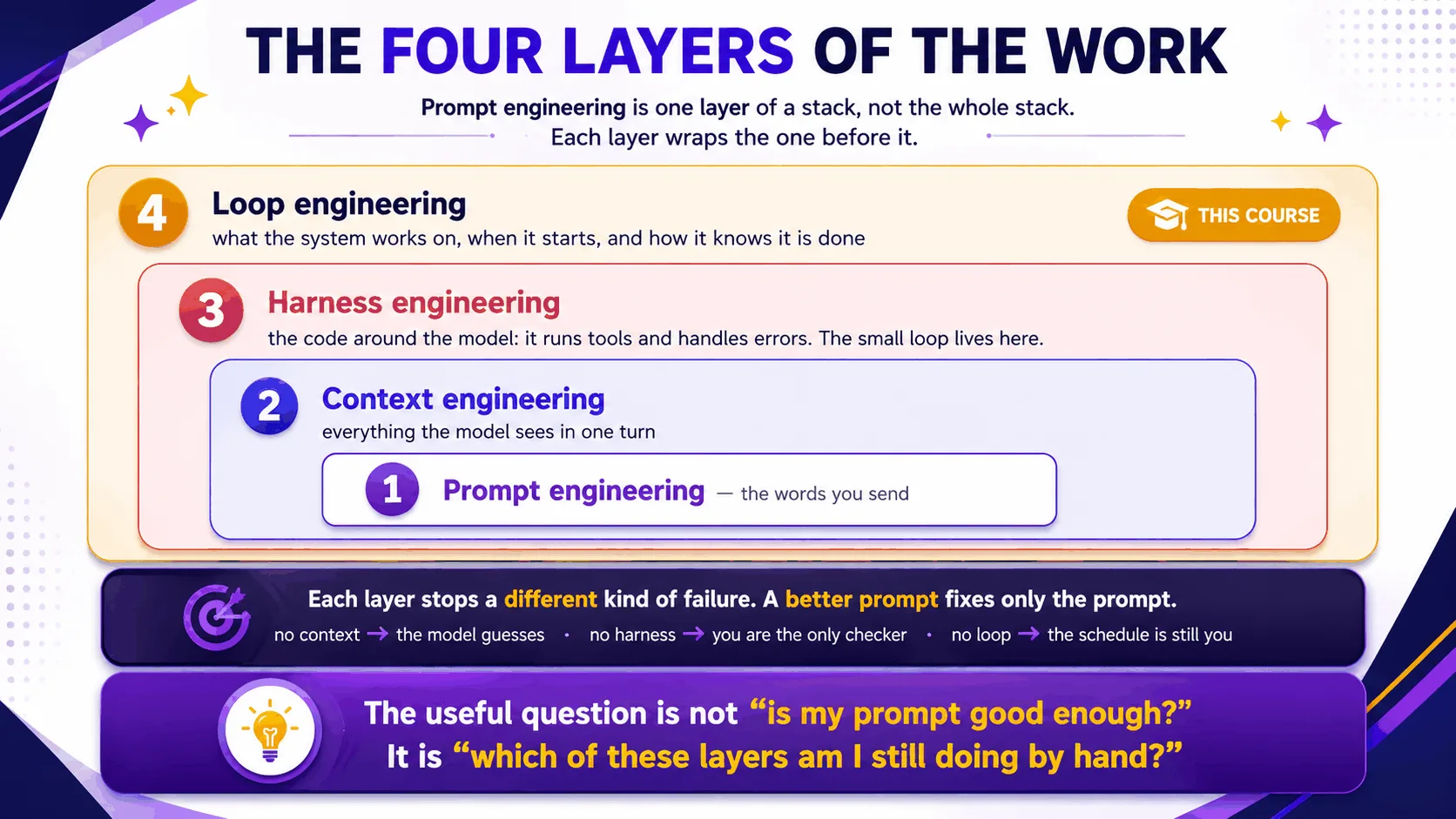
Prompt → context → harness → loop. Working out which layer you're standing in is the fastest way to know which tool will actually fix your problem.
The hook
Two engineers hit the identical bug: the agent keeps "fixing" a file it should never touch. One spends the whole afternoon rewording the prompt — politely, then firmly, then in all caps. The other adds a single deny rule to the harness permissions and moves on to lunch. Same bug, different layer. Only one of them worked on the layer that could fix it.
The four layers (plain English)
- Prompt — the words you send this turn. Cheapest to change, weakest guarantees.
- Context — everything the model can see: rules files, open files, prior turns. You curate this layer, and it's why the same prompt lands differently on different days.
- Harness — the vendor-built software shell around the model: tool execution, permissions, hooks. Guarantees live here, because code can't be talked out of anything.
- Loop — the outer cycle you engineer: what to work on, when to run, when it's done, who checks. Judgment lives here.
The foundations page the-four-layers.md maps the stack itself. This step adds the one thing that matters most for looping: the small loop and the big loop are different layers.
The small loop vs. the big loop
Inside the harness, a loop already exists. The model calls a tool, reads the result, calls another, and keeps going until the turn ends. You don't build that one. What you build sits one layer up:
# the small loop — the harness runs this for you, inside ONE beat
while True:
    action = model.decide(context)
    if action.is_done: break
    context += harness.execute(action)   # tool call → result → back to model

# the big loop — YOU engineer this; each beat invokes the small loop once
while not stopping_condition_met():      # provable, or it isn't a stop
    read_spine()                         # durable state, not memory
    do_one_unit_of_work()                # one beat = one small-loop run
    update_spine_and_log()
Blur the two and you get the classic errors. You expect the harness to know when the project is done — but it only ever knows when a turn is done. Or you hand-build tool plumbing the harness already does better than you can.
The layers in each tool
Each tool exposes all four layers under its own names. Here's where to reach for each one:
# Claude Code — live docs: https://docs.claude.com/en/docs/claude-code
# 1 Prompt:   what you type (or a /loop prompt)
# 2 Context:  CLAUDE.md, @file mentions, /context
# 3 Harness:  /permissions, hooks in .claude/settings.json
# 4 Loop:     /loop, scheduled tasks, your spine + rulebook (like this repo's LOOP.md)
# OpenCode — live docs: https://opencode.ai/docs
# 1 Prompt: opencode run "..."
# 2 Context: AGENTS.md, attached files
# 3 Harness: permission config in opencode.json
# 4 Loop: shell timers / capped for-loops / CI schedules around `opencode run`[!NOTE] Going deeper: the harness-vs-loop boundary, and the two debts it shields you from, live in concepts.md. The rule of thumb from there applies here word for word: guarantees in the harness, judgment in the loop.
Check yourself
Q: Your loop keeps committing to main even though the prompt says "always use a
branch." Which layer is failing, and which layer holds the fix?
Answer
The failure is at the prompt/context layer — prose rules are requests, not guarantees.
The fix belongs one layer down, in the harness: a permission rule or hook that blocks
commits to main outright. Words ask. The harness enforces.
Try With AI
In a throwaway repo, give your agent a rule in prose ("never edit files in legacy/") and
ask it to summarize its constraints. Then, in a fresh session, give the same rule as a
harness permission and ask it to edit legacy/anything.txt. Watch where each one fails.
You've just measured, with your own eyes, the difference between layer 1 and layer 3.
When it goes wrong
| Symptom | Cause | Fix |
|---|---|---|
| Re-prompting harder changes nothing | The problem lives below the prompt layer | Find the layer: context (missing rules?), harness (missing guard?), loop (missing stop?) |
| Agent forgets project rules every session | Rules live in chat, not context | Move them to the rules file (CLAUDE.md / AGENTS.md) |
| "The loop is smart, why does it repeat work?" | No spine — big-loop state kept in small-loop memory | Durable state file, read at every beat (Step 12) |
| Guardrail bypassed under pressure | The guarantee was placed in prose | Move it to permissions/hooks — the harness can't be argued with |
Glossary terms used on this page: harness, loop, beat, spine, rules file — see the glossary.
Sources: the prompt → context → harness → loop ladder comes from Panaversity's Loop Engineering: A Crash Course (S1); the small-vs-big-loop framing from Sydney Runkle's The Art of Loop Engineering (S6). Full attribution: resources/sources.md.